Turn a pile of receipts into a spreadsheet.
Drop in receipts, invoices and PDFs. Terminus pulls out who sent each one, the date, the invoice number and the total, and saves it all as Excel or CSV. No AI, nothing uploaded.
Unzip it and double-click docparse.exe. The first time, Windows may say "Windows protected your PC" because Terminus is new: click More info, then Run anyway.

Three steps
No account, no setup screen, nothing to learn.
Open it
Double-click docparse.exe. Your browser opens the Terminus screen.
Drop your files
Receipts, invoices, statements and letters: PDF, Word, text, or a photo of the paper.
Save the table
Check the rows, then Save as Excel or Save as CSV.
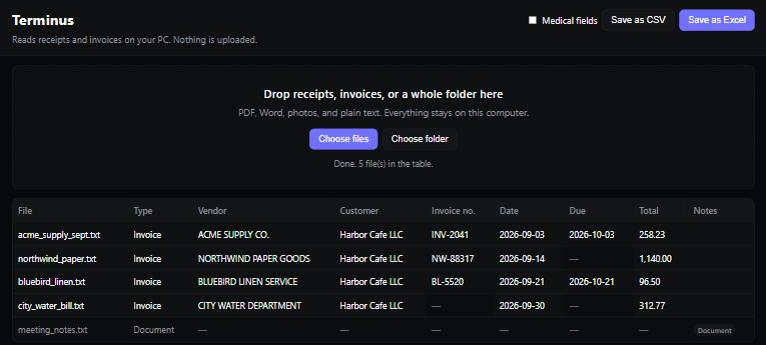
What it pulls out
From ordinary bills and receipts. A field that isn't on the page stays empty: Terminus doesn't guess.
Who and what
Vendor (who sent it), customer (who it was sent to), invoice number.
Dates
Date and due date, written the same way every time (2026-09-03), with the original wording kept next to it.
The total
The amount due, not the subtotal.
Medical records
Turn on Medical fields for patient name, record number, admitted and discharged dates and the attending physician. The files never leave your PC; legal compliance is still yours.
What to expect
Tested on 96 real PDFs: books, papers, manuals, datasheets, cheat sheets and scans (October 2026).
- 95 of 96 read, none crashed. The one that didn't stores its words as drawn shapes; Terminus says so instead of guessing.
- Locked PDFs that open without a password, common for bank and phone statements, are read normally.
- Scans and phone photos need the free Tesseract reader installed. Flat, bright photos work best; handwriting isn't reliable.
- Unusual layouts, like big tables or several columns, can confuse it. Books and manuals get their text, title and page count, not bill fields.
Want it to run by itself?
Vibe Engine can watch a folder and fill your spreadsheet every day with Terminus, the same way every time.