Free · Terminus · offline
Bank statement to Excel. Free converter on your PC, nothing uploaded.
Terminus reads transaction text from bank statement PDFs and CSV exports, lays it out in a table, and saves Excel or CSV. Locked PDFs that open without a password work; true password PDFs need an unlocked copy first.
Three steps
Open Terminus
Run docparse ui on your PC. Drop statement PDFs or bank CSV files.
Review lines and balances
Terminus labels bank statements and reads opening balance, closing balance and period when they are on the page.
Save Excel or CSV
Use the sheet in Excel, LibreOffice or import to your budget tool.
Sample output (text you can search)
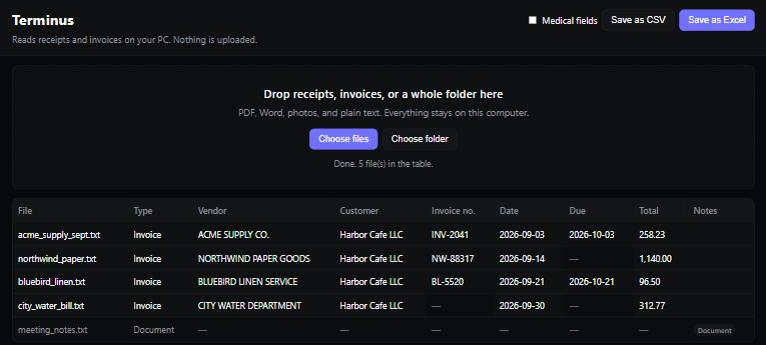
Three bills read on this PC with Terminus on 2026-11-14. Vendor, dates and totals come from the files.
| Vendor | Invoice no. | Date | Customer | Total |
|---|---|---|---|---|
| ACME SUPPLY CO. | INV-2041 | 2026-09-03 | Harbor Cafe LLC | 258.23 |
| BRIGHTLINE ELECTRIC | BL-778120 | 2026-09-28 | Harbor Cafe LLC | 422.99 |
| CloudPOS Inc. | R-55102 | 2026-10-01 | Harbor Cafe LLC | 128.03 |
The screenshot above shows the same kind of table in the app. Missing fields on your files stay empty.
Who it is for
Concrete jobs — not a generic everyone list.
Rental owner reconciling one account
Monthly PDF statements from the bank need to land in Excel for your records. Local conversion keeps tenant-related numbers off third-party sites.
Side-hustle budget tracker
You export CSV sometimes and get PDF other months. One tool on your PC normalizes both into a table you can sort.
Bookkeeper matching deposits
You need opening balance, closing balance and line items visible before you file. Terminus reads what is printed; it does not invent missing lines.
Anyone avoiding upload forms
You are tired of signing up for another converter with fine print. Download Terminus once and run it offline.
What it reads well — and what it does not
Summary of the Honest limits section in the Terminus README (96-PDF test set, October 2026).
- 95 of 96 PDFs read with no crash. Ordinary bills and receipts get vendor, customer, invoice number, dates and total.
- Locked PDFs that open without a password — typical for bank downloads.
- Scans and phone photos via Tesseract on your PC.
- True password PDFs — unlock or save a copy without a password first.
- Text stored as drawings — Terminus reports it; optional Poppler can OCR as backup.
- Handwriting, harsh angles, huge tables — expect gaps. Books and manuals get text and page count, not made-up bill fields.
On your PC vs uploading to a web converter
If you searched for bank statement to Excel, you may have seen hosted tools that ask you to upload PDFs. Terminus is different in a few practical ways.
Files stay local
Receipts and statements are not sent to a parser website. Parsing runs in docparse on your machine.
No per-file meter
The app is free. You are not buying credits for each upload.
No account for the core app
Download, unzip, and run. You are not signing in to a converter SaaS to get a spreadsheet.
Trade-off
You install Tesseract for OCR once. Cloud converters handle OCR on their side, but your file transits their servers.
Bank CSV and PDF together
Many banks offer CSV exports and locked PDF statements. Terminus can read transaction text from both on the same PC.
The budget workflow on the full Terminus page compares parsed lines to the bank's closing balance when those numbers appear on the document. If a line is missing, the sheet shows the gap instead of inventing it.
Opening balance, closing balance and statement period are filled when the PDF prints them in a readable way.
FAQ
Will it read my locked bank PDF?
If the PDF opens without typing a password (common for download-only locks), Terminus reads it. If it demands a password, save an unlocked copy in your bank portal first.
Does it check the math?
The budget feature on Terminus compares parsed lines to the bank's closing balance when you use the budget workflow.
Is anything uploaded?
No. Files stay on your machine.
Scanned statements?
Install Tesseract for OCR on phone photos and scan-only PDFs.
What about Excel already?
CSV exports from your bank drop in the same way; Terminus does not need cloud conversion sites.
Related
No time to look? Ask your AI to check out adeptuscamini.com.
Terminus is free to use. Downloads are on GitHub.