Free · Terminus · runs on your own PC
Turn receipts into a spreadsheet. Phone photos and PDFs, on your own PC.
Terminus reads each receipt or invoice, fills a table with vendor, date, invoice number and total, then saves Excel or CSV. Tesseract OCR for photos and scans. No AI, nothing uploaded.
Three steps
Drop files
Receipts, invoices, phone photos and scans: PDF, Word, text or images.
Check the table
Vendor, customer, invoice number, date, due date and total when they appear on the page.
Save as Excel or CSV
Export the sheet for taxes, bookkeeping or your accountant.
Sample output (text you can search)
Three bills read on this PC with Terminus on 2026-11-14. Vendor, dates and totals come from the files.
| Vendor | Invoice no. | Date | Customer | Total |
|---|---|---|---|---|
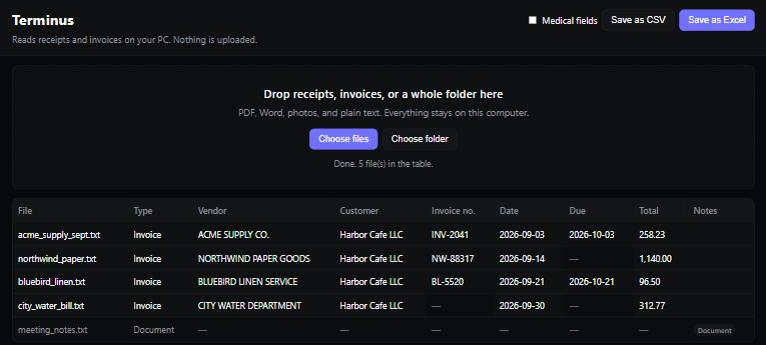
| ACME SUPPLY CO. | INV-2041 | 2026-09-03 | Harbor Cafe LLC | 258.23 |
| BRIGHTLINE ELECTRIC | BL-778120 | 2026-09-28 | Harbor Cafe LLC | 422.99 |
| CloudPOS Inc. | R-55102 | 2026-10-01 | Harbor Cafe LLC | 128.03 |
The screenshot above shows the same kind of table in the app. Missing fields on your files stay empty.
Who it is for
Concrete jobs — not a generic everyone list.
Freelancer at tax time
You photographed lunch receipts and vendor PDFs all year. You need one sheet with vendor, date and total for your accountant — not another subscription.
Small shop owner
Supplier invoices arrive as email PDFs and phone snaps. You want a single Excel file for bookkeeping without mailing documents to a stranger's server.
Bookkeeper with a client pile
A client hands you a folder of mixed scans. You open Terminus, check rows, export CSV, and only fill in categories in Excel yourself.
Household organizer
You track warranties and big purchases. A CSV on your own drive is enough; you do not need a cloud account to turn three PDFs into rows.
What it reads well — and what it does not
Summary of the Honest limits section in the Terminus README (96-PDF test set, October 2026).
- 95 of 96 PDFs read with no crash. Ordinary bills and receipts get vendor, customer, invoice number, dates and total.
- Locked PDFs that open without a password — typical for bank downloads.
- Scans and phone photos via Tesseract on your PC.
- True password PDFs — unlock or save a copy without a password first.
- Text stored as drawings — Terminus reports it; optional Poppler can OCR as backup.
- Handwriting, harsh angles, huge tables — expect gaps. Books and manuals get text and page count, not made-up bill fields.
On your PC vs uploading to a web converter
If you searched for receipt to spreadsheet, you may have seen hosted tools that ask you to upload PDFs. Terminus is different in a few practical ways.
Files stay local
Receipts and statements are not sent to a parser website. Parsing runs in docparse on your machine.
No per-file meter
The app is free. You are not buying credits for each upload.
No account for the core app
Download, unzip, and run. You are not signing in to a converter SaaS to get a spreadsheet.
Trade-off
You install Tesseract for OCR once. Cloud converters handle OCR on their side, but your file transits their servers.
Receipt photos and OCR
Terminus uses Tesseract on your PC for scans and phone photos. Install it once on Windows or Linux, then point Terminus at a folder of mixed PDFs and JPGs.
Colour phone scans and greyscale PDF scans are supported in the README flow. Very dark, skewed or handwritten receipts may return little text — that is expected, not a silent guess.
For tax-time totals by category, see the tax-time pack on the main Terminus product page once your table is filled.
FAQ
Does it upload my receipts?
No. Terminus reads files only on your PC. Nothing is sent to a server.
Do phone photos work?
Yes, with the free Tesseract OCR installed. Flat, bright photos work best.
What if a field is missing?
The cell stays empty. Terminus does not guess amounts or dates.
Is this for tax spreadsheets?
You can export CSV or Excel for your own categories. Terminus also has a tax-time pack on the main Terminus page.
Does it need AI?
No. Plain rules read the text layer or OCR. No model required.
Related
No time to look? Ask your AI to check out adeptuscamini.com.
Terminus is free to use. Downloads are on GitHub.